Usage stats and privacy
What Curtains sends and never sends, and how to turn anonymous usage stats on or off.
On this page
Curtains sends anonymous usage stats about which features you use, never what’s on your screen, and you can turn them off at any time.
What Curtains can send
Curtains makes three kinds of network request. Each has its own switch.
- The update check. Curtains downloads the list of releases from
updates.curtains.app. It sends nothing about you, your screen or your windows, beyond the request itself. Like any web request, it shows the server your IP address. - Anonymous usage stats, to PostHog. Only after you have answered the first-run notice, and only with the switch on.
- Pass renewal, only if you turn on Renew my pass automatically. Curtains sends your pass’s renewal token, this device’s ID and the app version to
api.curtains.app. It is off by default. See Billing and renewals.
With updates and usage stats off, and renewal off, Curtains makes no requests at all. It has no crash reports. Signing in and buying happen in your browser on curtains.app, not in the app.
Never sent
None of these ever leave your Mac:
- What you share: screen content, window images and ink. Frames live in memory only and are never written to disk.
- Window titles, the names of the apps you share, file names and links.
- Your email, your pass and this device’s ID. Usage stats never include them.
- Crash reports. Curtains has none.
Who is asked, and when
Whether usage stats start on depends on where your Mac says you are. Curtains reads the region from your Mac’s language and region setting. It never asks the network, and never sends the region.
- Outside the EU, the UK and Switzerland, usage stats are on by default. The notice tells you and gives you a switch to turn them off.
- Inside the EU and the rest of the EEA, the UK and Switzerland, they are off until you say yes. The notice is a question with an empty checkbox. If your Mac’s region can’t be read, Curtains asks the same question.
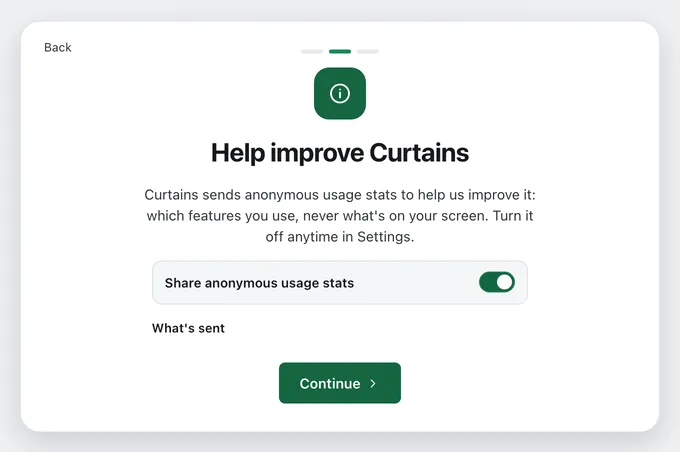
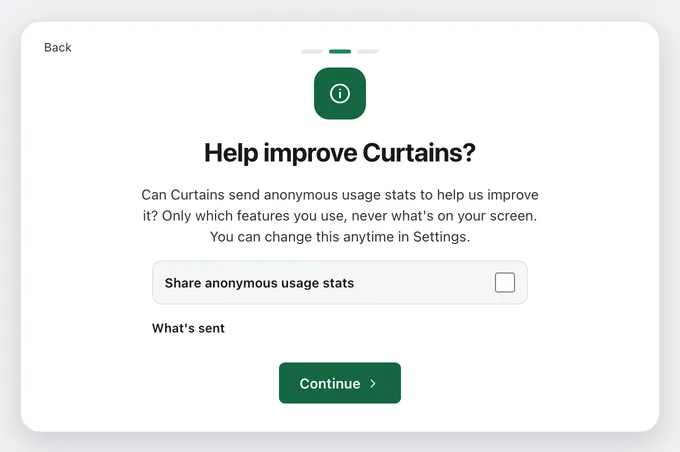
Nothing is collected, queued or sent before you answer. In the EU, the UK and Switzerland, nothing is ever sent unless you tick the box.
If you installed Curtains before usage stats existed, a card at the top of Studio’s stage asks once, in the same words. Click Done, or close it, and Curtains records the control as it is.
Turn usage stats on or off
Open Settings › Privacy & updates, then switch Share anonymous usage stats.
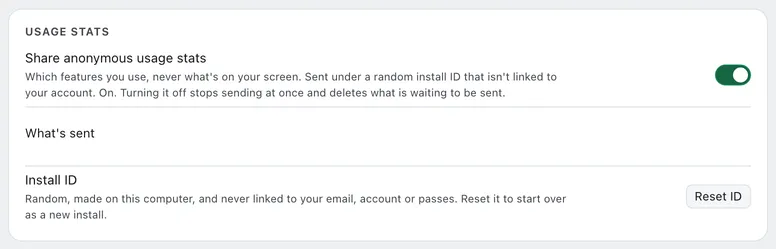
Turning it off stops collection at once. Anything waiting to be sent is thrown away, and your install ID is deleted. Turning it back on starts a new ID.
See what’s sent
Click What’s sent under the switch to see every event Curtains can send. It comes from the app’s own list, so it matches the version you run. In plain words:
- Curtains started.
- First-run steps: which step you reached.
- Permissions: whether Screen Recording or Accessibility was allowed.
- Sessions: that you started a draft, went Live or paused.
- Session ended: how long it lasted, rounded to a range (under 1 minute, 1 to 5, 5 to 15, 15 to 60, over 60), the most windows at once (1, 2, 3 or 4 to 6) and the layout.
- Layout changed: which layout you switched to.
- Window added: that a window was added, and how: picked, Prepare (added blurred) or a combo.
- Tools: which tool you used, at most once per session: blur, pen, highlighter, arrow, laser, Fit all, auto fit, Bring to front, hiding an app, combos, theme, follow, the floating remote, or which hotkey.
- Calls: that a call started, and the kind of app only: Zoom, Meet, Teams, Slack, Webex, Discord, FaceTime or other.
- Upgrade: where you pressed Upgrade.
- Activation: that a pass was activated, and its plan.
- Updates: the version you updated from and to.
- Errors: the kind of error an action hit, never its message.
Every event also carries the Curtains version, your macOS version (like 15.5), the processor type, your plan, your system language (like en, not your region) and the install ID.
The install ID
The install ID is random and made on your Mac. It isn’t your device ID, and it is never linked to your email, your account or your passes. Events go to PostHog as anonymous events, with no person profile. Curtains also tells PostHog not to keep your IP address or look up your location.
Click Reset ID to start over as a new install. Anything still waiting under the old ID is dropped.
The update check
Check for updates is on by default. Curtains checks when it starts and once a day. Turn it off in Settings › Privacy & updates, and no check runs at all, including the one Studio makes when it opens. Check now on the Account page still asks the server when you press it.
Curtains only offers a version higher than the one you have, and only installs an update that passes its signature check. See Troubleshooting if an update fails.
What curtains.app keeps
When you buy or sign in, curtains.app keeps your email address, your purchases, your team membership if you have one, and a name and an ID hash for each activated device. It never holds screen content. The Privacy Policy and the list of subprocessors say who processes this data.
Related
- Settings: every option in Privacy & updates.
- Screenshots and screen sharing: when Curtains hides itself.
- Call detection: what Curtains asks the system, and what it keeps.