Focus
Make one window the big one, then Unfocus to get your layout back.
On this page
Focus makes one window the big one: to focus a window is to make it fill the stage, and Unfocus puts your layout back exactly as it was.
How Focus works
There is one Focus action, and it follows one rule: the focused window becomes the big one.
- In the Focus layout, the focused window is the large window, and the others stay in the filmstrip. Focusing the large window again changes nothing, because there is nothing to go back to.
- In Grid, Follow and Free, the focused window grows to fill the canvas. Viewers see only that window until you Unfocus, and then everything returns to the exact previous layout.
While a window fills the canvas, its pill on the preview and its row in the Order list read Focused, and the action is called Unfocus.
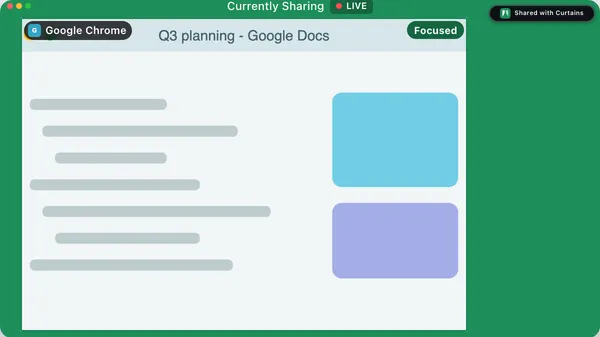
Focus a window
Use whichever is closest:
- Double-click the window on the preview.
- Double-click its row in the Order list, in the Layout panel.
- Press B on a window or a row you’ve reached with Tab.
- In the Focus layout, click a thumbnail in the filmstrip or a row in the Order list.
- Press Control Option 1 to Control Option 6 from any app to focus the first to sixth window. These only focus; they never unfocus.
- Press Control Option F from any app to focus the active window, which is the shared window in front on your desktop. Other apps in front are ignored.
- Click the tab on a shared window and choose Focus.
- On the floating remote, open the ⋯ menu and choose Focus next window or Focus previous window.
Unfocus
To get your layout back, do any of these while a window fills the canvas:
- Double-click the focused window again.
- Press Esc in Studio.
- Press Control Option F. If no shared window is on screen, it ends a focus that fills the canvas.
- Press B on the focused window or row.
Choosing a different layout, moving a window in Free, or taking the focused window off the canvas also ends the focus, and shows the new layout.
If you focus a different window while one is focused, Curtains switches to it and still remembers the original layout.
Hotkeys can be changed
The global Focus keys are listed in Settings › Shortcuts, where you can change each one.
Related
- Layouts: the four layouts Focus builds on.
- Rearrange windows: swap windows without focusing.
- Keyboard shortcuts
- Floating remote and menu bar