Combos
Save a set of windows with their layout and start the same share in one click.
On this page
A combo saves your windows and how you arranged them, so you can start the same share again with one click or one key.
What a combo saves
- Which windows, by app and window title, in canvas order.
- The layout, and where each window is in Free.
- Which window is the large one in Focus.
- Blur regions and whole-window blur.
- An optional hotkey.
It doesn’t save your theme, your ink, or the state of the apps themselves. Combos are stored on your Mac.
Save a combo
- Pick your windows and arrange them, in a draft or while you’re sharing.
- Click Combos in the rail on the left edge.
- Under Save what you share now as a combo, type a name in Combo name.
- Click Save combo.
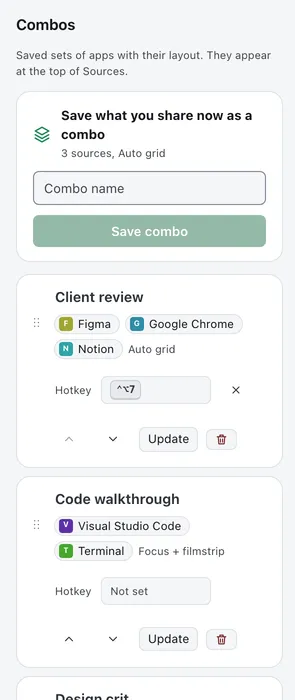
The save box stays disabled until at least one window is picked.
Start a combo
With no session running, the Combos panel opens by default, and Start is on each combo. If you’ve folded the panel away, your combos are listed at the top of Sources instead, each with a Start button. They’re hidden from Sources while you search or while the Combos panel is open.
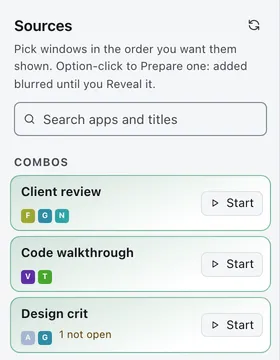
Curtains looks for each saved window among your open ones: an exact title match first, then a title pattern, then the app’s front window. It starts with whatever it finds, and a message names any app it couldn’t find, and any windows left out by your plan’s limit. A combo with none of its apps open can’t start.
A combo starts the session directly, with Curtains Presenter open. With Start Paused on in Settings › Presenter, which is the default, it starts Paused: viewers see the holding card, and you can check the layout and blur before you click Live. With Start Paused off, it starts Live. A combo’s saved blur is applied from the first frame either way.
Starting a combo replaces a draft you had going. You can’t start one while Curtains Presenter is already open, so End the session first.
Start a combo with a key
Give a combo its own hotkey in its Hotkey field in the Combos panel. The key works from any app. Combos with a hotkey are also listed in the Shortcuts sheet in the rail.
Update, rename, reorder and delete
- Rename: click the combo’s name.
- Reorder: drag its grip, or use the up and down buttons.
- Update: while you’re sharing, click Update, then Replace?, to replace the combo with what you share now.
- Delete: click the bin, then Confirm.
Replacing and deleting each ask twice, because they can’t be undone.